Launching a Shopify ecommerce website is part. Getting it found on Google is where most merchants have problems. Shopify handles SEO basics automatically, which gives owners a false sense of security. The platform won’t stop you from making URLs, uploading large hero images or leaving every product title as a supplier code.
The same errors keep appearing across Shopify stores of every size. Most are easy to fix once you know where to look. Below are eleven mistakes that quietly take away traffic, along with a practical technical SEO checklist on page SEO fixes and off-page SEO habits you can start this week.
1. Letting Duplicate URLs and Thin Pages Pile Up
Shopify can show one product at two addresses:
/products/shirt and /collections/shirts/products/blue-shirt.
A canonical tag usually points to the version, but some themes and apps change it, and internal links often use the longer path, which splits link equity.
Tag and filter URLs add to the problem. A collection filtered by colour and size can create thousands of identical pages that waste crawl budgets without ever ranking. Make sure your theme links to the /products/ URL, check canonicals with Google Search Console’s URL Inspection tool on a sample of pages and keep filtered or tag pages out of the index unless they meet a real search demand.
2. Treating Technical SEO as a One-Time Setup
A technical SEO checklist only works if you go over it again. Review these items every three months. After any big theme or app change:
- Submit your sitemap.xml in Google Search Console and compare the indexed pages with what you expect.
- Edit robots.txt.liquid carefully; one wrong line can block collections.
- Fix 404 errors and redirect chains with Shopify’s URL redirects tool.
- Check Core Web Vitals on mobile, not on desktop.
- Validate Product, Review and Breadcrumb structured data.
- Keep an H1 on every template.
Free Download: Shopify Technical SEO Checklist
Audit your store in minutes with our one-page checklist. It covers 28 checks across crawling, site structure, speed, on-page SEO, structured data, redirects and tracking, so you can run a quarterly review with confidence.
Download the free checklist (PDF)
Stores that skip this routine usually discover problems only after traffic has already dropped.
3. Letting Apps and Heavy Images Slow Your Store
Every app you install usually adds JavaScript code, and Shopify stores that run twenty or more apps often do not meet Core Web Vitals on mobile. Large images make the problem worse; a homepage slider with six photos that are each 3 MB can push the Largest Contentful Paint beyond four seconds.
Audit your apps and delete anything that is not used, then look at theme. Liquid for any leftover code from apps that you have uninstalled. Look in Liquid for any leftover code from apps that you have uninstalled. Compress images to WebP, set a width and height to stop layout shift, lazy load images that are below the fold but never the main banner and choose a lightweight theme. Run PageSpeed Insights before and after each change so you know what truly helped, not guessing.
4. Weak On-Page SEO on Products and Collections
On-page SEO is where many Shopify stores lose revenue. Common problems include manufacturer descriptions that are copied across dozens of competing sites, title tags that read “Product Name Store Name”, missing alt text and collection pages that have no copy at all.
Give each collection an introduction of 100 to 200 words that uses the main keyword naturally and answers a buyer’s question. Write product descriptions that cover materials, sizing, use cases and care. Place the keyword in the title tag, H1 and URL handle and write meta descriptions that earn the click. Describe images in alt text for people using screen readers, not for keyword stuffing.
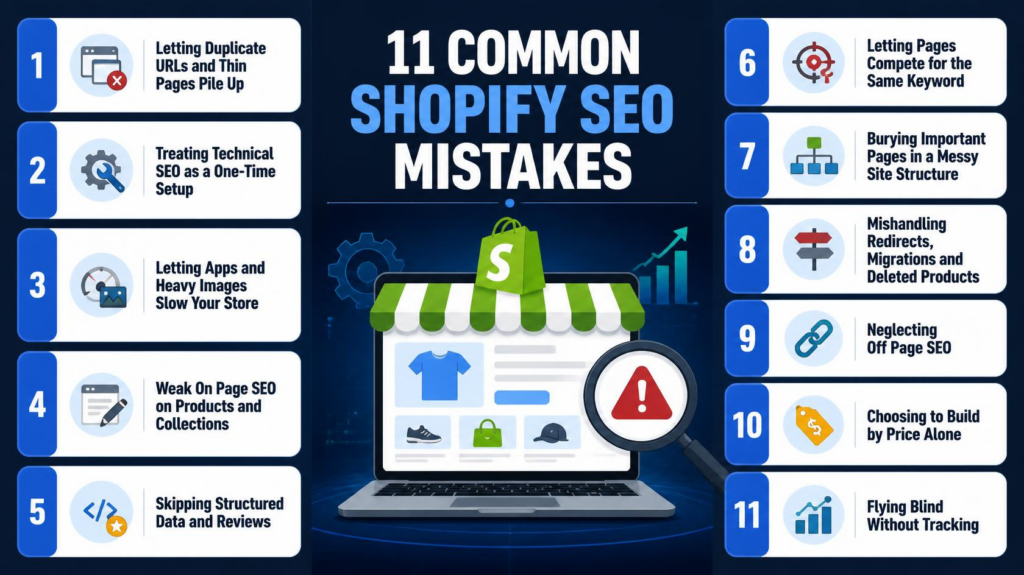
5. Skipping Structured Data and Reviews
Product schema lets Google display price, availability and star ratings in search results, which can lift click‑through noticeably. Many Shopify themes output basic markup, and review apps sometimes inject duplicate or invalid schema that Google ignores.
Test key templates with Google’s Rich Results Test. Fix errors in Search Console’s enhancements reports. Collect reviews with post‑purchase emails and never fake them because review markup that breaks Google’s guidelines can trigger a manual action. Add FAQ content to collection pages where it genuinely helps shoppers.
6. Letting Pages Compete for the Same Keyword
When a blog post, a collection and a product all target “leather laptop bag”, Google struggles to pick a winner. None of them ranks well. Build a spreadsheet that maps each primary keyword to exactly one URL.
As a rule, collections should target terms, blog posts should handle informational searches, and product pages should match specific model queries. Link from the blog to the collection using descriptive anchor text and merge or redirect older posts that overlap. This single clean-up often lifts rankings without writing a new page.
7. Burying Important Pages in a Messy Site Structure
Shopify navigation menus tend to grow until nothing stands out and key collections end up three or four clicks from the homepage. Google gives attention to deep pages, and shoppers give up on them too.
Keep priority collections within two clicks of the homepage, add breadcrumbs and link products and buying guides to each other. Check for orphaned pages such as campaign landing pages that nothing links to. A crawl with Screaming Frog or Sitebulb will list them in minutes. Adding two or three contextual links to each usually brings them back into the index.
8. Mishandling Redirects, Migrations and Deleted Products
Moving to Shopify or simply retiring a product is a traffic killer. A deleted page returns a 404. Wastes every backlink pointing at it. Shopify stores that migrate from WooCommerce or Magento without a redirect map can lose a share of organic traffic within weeks.
Before launch, export every URL and map each to its closest new equivalent with a 301 redirect. Recheck Search Console two weeks after going live for spikes in “Not found” errors; for products, keep the page live with in‑stock alternatives or redirect to the parent collection if no close match exists.
9. Neglecting Off Page SEO
Off-page SEO covers the signals earned beyond your pages: backlinks, brand mentions and reviews. Many founders ignore it entirely. Buy cheap link packages that risk a penalty. Better approaches are slower but safer.
Pitch products to niche bloggers for reviews, offer expert quotes to journalists, list your brand in relevant supplier and local directories and co‑create guides with complementary brands. Publishing something citing a shipping‑cost study or a sizing survey earns links naturally. Ten links from sites will do more for your Shopify ecommerce website than two hundred from unrelated ones, so prioritise relevance over volume.
10. Choosing to Build by Price Alone
The Shopify website cost can change a lot. If you use a template and a premium theme, you might pay a hundred dollars plus a monthly plan. If you want a custom build with migration and integrations, the price can reach thousands of dollars. The mistake is to look at the headline number. A cheap build that ignores URL structure, page speed and schema creates SEO debt that you will pay for later.
If you hire a Shopify website development agency, ask questions.
- Who will handle redirects during migration?
- How will the agency test Core Web Vitals?
- Will you receive an SEO checklist when the project is finished?
- Can the agency show results from Shopify stores?
Ask for an itemised quote that separates design, development, migration, app setup and SEO. This way you can see where the budget goes and what might be missing.
11. Flying Blind Without Tracking
Without Google Search Console, GA4 and a rank tracker, you are guessing. Set all three tools up before launch. Annotate changes and review them each month. Look at impressions, clicks, indexed pages, top landing pages and revenue per session.
Start with pages that get impressions but few clicks. Rewriting their title tags and meta descriptions is one of the wins. It does not need a developer. Over time, a monthly report shows which fixes actually moved revenue. This makes the next budget conversation much easier.
Final Thoughts
Most Shopify SEO problems are not complicated. They usually come down to the basics: duplicate URLs, slow pages, thin product copy, missing redirects and no tracking to show what is working. Get those first. Then put effort into content and link building.
Whether you run a Shopify store or manage a large catalogue, a quarterly audit will protect your rankings and revenue. Download our technical SEO checklist. Start with Google Search Console this week. Pick the three issues that affect your store most and fix them before adding anything.
If you prefer not to handle this, a Shopify website development agency can take on the heavy work. This includes migrations, speed optimisation, schema and redirect mapping. Look for a partner who builds SEO into the project from day one. Do not add it as an afterthought.
Ready to grow your store with an SEO foundation? Talk to the FirstLaunch team. They offer a Shopify build or audit that is made to rank.
Frequently Asked Questions
What are common SEO mistakes to avoid?
The most common mistakes are duplicate or thin pages, slow load times caused by heavy apps and images, copied product descriptions, keyword cannibalisation, missing redirects after migration, ignored structured data and no tracking. Fixing these basics before chasing advanced tactics gives the quickest, most dependable gains.
How much does a Shopify website cost?
A basic store using a premium theme can cost a few hundred dollars to set up, plus a Shopify plan and any paid apps. Custom design, migration and integrations raise the figure to several thousand dollars. Always ask for an itemised quote, and check SEO work is included.
Do I need a Shopify website development agency?
Not always. You can build simple stores with a quality theme and careful setup. An agency makes sense for custom features, large catalogues, complex migrations or when your team lacks time. Choose one that shows measurable SEO results from comparable Shopify stores.
What is the difference between on-page SEO and off-page SEO?
On-page SEO covers what you control on your site: titles, copy, headings, images, internal links and page speed. Off-page SEO covers external signals such as backlinks, brand mentions and reviews. Strong rankings need both working together.
How often should I run a technical SEO audit?
Run a full technical SEO checklist every quarter, and a quick Search Console check monthly. Also audit after theme changes, app installs, migrations or any sudden drop in impressions, since these events cause most technical regressions.

