Launching a store is the start. Whether you have just created a Shopify website or you are growing an existing Shopify online store, traffic is what turns a nice-looking shop into a successful business. Paid ads can bring visits, but they stop when your budget ends. A blog that is properly optimized, however, keeps bringing visitors months and years after you publish it.
In this guide, we talk about Shopify blog SEO practices that really make a difference. You will learn how search engine optimization works for shopping content, how to do good keyword research, how to use Google Keyword Planner, and how to make every post so it gets good rankings and money.
Why a Blog Is Essential for Your Shopify Store
Product and collection pages are made to make sales. They often do not rank for the questions customers have before they buy. Blog posts help with that. They let you connect with people when they are looking for information, like someone searching “how to choose running shoes for feet,” and guide them gently toward your products.
A regular blog also builds knowledge in your area. When Google sees that your Shopify website regularly has relevant content about your topic, it becomes more confident in suggesting your pages. Over time, blog posts get links from websites, improve your internal links, and make your product pages more visible too. Shopify has a built-in blog platform, so you do not need any tools to start.
Start With Solid Keyword Research
Every good post starts with keyword research. Without it you are just guessing what your audience wants. With it, you can make a content plan based on interest.
Start by listing the topics your store covers. A skincare brand might begin with ingredients, routines, and skin problems. Then make each topic into questions and phrases that customers use. Look at your support emails, product reviews, and social media comments for the words people use.
Next, group your keywords by purpose and difficulty. New stores should focus on long-tail phrases, which are longer and more specific searches with less competition. “Best vegan leather tote bags for work” is much easier to win than “tote bags.” Aim for one keyword per post supported by three to five related words that appear naturally in the content.
Use the Right Tools for Keyword Research
Good keyword research uses a mix of tools, each with its strengths. This workflow is built for SEO, not for advertising.
- Start with seed topics. Think about the products, problems, and questions that matter most to your customers. Make a list of these core ideas.
- Next, expand your list using Semrush or Ahrefs. In Semrush, use the Keyword Magic Tool. In Ahrefs, use Keywords Explorer. Both tools give you search volume, related keywords, and a difficulty score that shows how hard it is to rank in search. Look for keywords that have search volume and aren’t too hard to rank for. You can also check competitors. See which keywords are already bringing traffic to Shopify stores. This helps you find gaps and opportunities.
- Check trends over time with Google Trends. Trends tell you if interest in a topic is growing, dropping, or seasonal. This is especially helpful for ecommerce. For example, a gift guide or holiday post should be published before the peak season. Timing matters.
- Validate your ideas with Google Search Console. Once your website starts getting traffic, Search Console shows which keywords bring impressions. If a post is ranking on page two, it’s a win. You can improve it. Push it higher.
Match Search Intent
Ranking is not about having a keyword, it is about meeting the reason behind the search. Google checks if your page really answers what the searcher wants.
Most searches fall into four types: informational (“what’s a capsule wardrobe”), commercial (“best linen bedsheets”), transactional (“buy organic cotton sheets”), and navigational (a brand name). Blog posts usually handle informational and commercial intent. Before you write, search your target keyword. Look at the top results. Are they step-by-step guides, lists, or comparisons? Copy the format, then add something better, like clearer examples, original photos, or expert tips. This step alone stops posts from failing even if the writing is good.
Plan a Content Around the Customer Journey
Random posts rarely create momentum. Instead, plan your content to match the stages of the buying journey. Awareness posts answer questions, consider posts compare options and explain features, and decision posts deal with concerns such as shipping, sizes, or returns.
Choose a schedule of maybe two posts a month that you can keep for a full year. Seasonal topics need planning, publish gift guides and holiday content at least six to eight weeks in advance so search engines have time to index and rank them. A simple spreadsheet with keyword, purpose, target date, and owner is enough to keep everyone responsible.
Optimize Your On-Page Elements
You have your keyword and your search intent. Now comes the step many stores skip: checking that your on-page SEO actually works once the post is live. Our free Chrome extension, SEO Captain, makes that check take seconds. Open any page, and one panel shows its meta title, meta description, canonical URL, robots tag, and more.
Here is how to spot the common problems and fix them:
- Meta title too long or too short. SEO Captain shows a live character count. If your title runs past roughly 60 characters, rewrite it so the main keyword sits near the front and the benefit is clear.
- Meta description cut off or missing. Aim for 150 to 160 characters. If the count is off, edit it in Shopify’s search engine listing preview at the bottom of the blog post.
- Weak heading structure. Use the H1 to H6 shortcuts to review your headings. You should see one H1 (your post title) and logical H2 and H3 headings that include related terms.
- Canonical URL issues. The panel shows your canonical tag next to the page URL. If a tracking parameter or duplicate URL appears, make sure the canonical points to the clean version of the page.
- Accidental no-index. The robots tag field tells you whether a page is set to be indexed. A stray no-index can keep a great post out of Google entirely.
- Missing details. Fields like author or publisher are flagged when empty, so you can fill them in for a more trustworthy, complete page.
- Images and links. Jump to the Images and Links views to review each image, broken image, image alt text and the links on the page, then fix anything that needs attention. Describe each image accurately in its alt text so it helps screen reader users and image search.
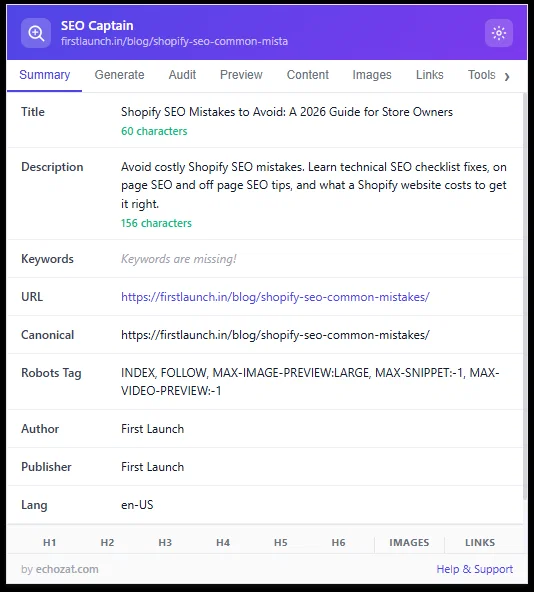
SEO Captain’s on-page report for a blog page.
Build a Smart Internal Linking Structure
Internal links help visitors move around your store and help search engines see how your pages connect. Every blog post should link to at least one relevant product or collection page, plus two or three related articles. Use anchor text instead of “click here.”
For example, a post about winter skincare can link to your moisturizer collection with the text “hydrating moisturizers for skin.” Over time, create topic clusters: one article supported by several detailed posts all linking back to it. This structure shows depth. Keeps readers browsing longer.
Get the Technical Foundations Right
Great content cannot fix a weak website. Fortunately, Shopify handles a lot of the basics. You should still check a few things.
- Speed and Core Web Vitals. Compress images before uploading, pick a theme, and remove apps you no longer use. Slow pages make shoppers frustrated and hurt rankings.
- Mobile experience. Most online shopping traffic now comes from phones, so check every post on a device and keep paragraphs short.
- Duplicate content. Shopify can make URLs for similar content through tags and pagination. Use tags, which most themes have by default, and avoid publishing similar posts.
- Indexing. Shopify automatically makes a sitemap at /sitemap.xml. Submit it in Google Search Console. Check the coverage report for errors.
- Structured data. Add schema markup for articles, products, and FAQs where it fits, since it can help show results in search.
If your store has technical problems, working with a Shopify website development company can save months of trial and error.
Write Content That Demonstrates Expertise
Google’s quality guidelines emphasize experience, expertise, authoritativeness, and trustworthiness. For an ecommerce brand, that means showing you actually know your products and customers.
Include real details: first-hand testing, customer stories, original photography, sizing advice, or lessons learned from mistakes. Add an author name and a short bio. Cite credible sources when sharing statistics. Keep paragraphs short, use subheadings, and write in a conversational tone, as if explaining something to a friend.
Aim for depth over length. A focused 1,500-word article that fully answers a question will outperform a padded 3,000-word one. Finish every post with a clear next step, whether that is a related guide, a product recommendation, or an email signup.
Promote, Update, and Repurpose
Publishing is not the end. Share each article in emails, social media, and relevant groups. Contact partners and websites that might link to a resource since good links are still a strong ranking factor.
Then plan to update posts. Every three months, check your posts and update old numbers, add new parts, fix broken links, and improve weak openings. Updating a post that already has some power is often faster and better than writing something. You can also use content in other ways, turning a popular guide into a short video, an infographic, or an email series.
Measure What Matters
Without tracking, you can’t get better. Connect Google Search Console and Google Analytics to your store, then watch metrics: impressions and clicks, average position, click-through rate, organic visits, and help from blog traffic to sales.
Look for posts that are on page two since small changes there can bring big results. Check which searches bring traffic and whether your title and meta description match them. Let the data guide your content plan instead of guessing.
Common Shopify Blog SEO Mistakes to Avoid
- Publishing without keyword research. A clear audience
- Adding too many keywords or writing for search engines instead of people
- Ignoring title tags, descriptions, and image text
- Leaving duplicate posts online
- Forgetting to link to products and collections
- Never updating older posts.
- Posting irregularly, then stopping the blog for months
Conclusion
Blog SEO is a long process, but the rewards grow over time. By combining keyword research matching what people want, strong on-page optimization, good technical health, and regular promotion, your Shopify online store can get a steady flow of visitors that does not rely on ads. Start with one researched post, measure the results, and keep improving.
Of course, great search engine optimization works best on a solid foundation. If you want a store that’s quick, easy to find, and designed to drive sales, the right Shopify website development company can make a big difference.
Ready to make your store bigger? FirstLaunch is a Shopify website development company that helps companies create, build, and improve successful Shopify stores. Reach out to FirstLaunch today. Turn your store into a place that brings in visitors and money.
Frequently Asked Questions
1. Does a blog really help the SEO of a Shopify ecommerce website?
Yes. Product pages rarely rank for the research-stage questions shoppers ask before buying. Blog posts capture that traffic, build topical authority, earn backlinks, and pass internal link value to your product and collection pages.
2. How do I do keyword research for my Shopify store?
List your core product topics, then expand them into the questions and long-tail phrases customers actually use. Check your reviews, support emails, and “People also ask” results. Validate your shortlist with tools like Google Keyword Planner and Google Search Console, and assign one primary keyword per post.
3. Can I use Google Keyword Planner without running ads?
Yes, but you need a Google Ads account. Without active campaigns, search volumes appear as ranges rather than exact numbers. It is best used alongside Google Trends and Search Console.
4. How often should I publish blog posts on Shopify?
Consistency matters more than volume. Two quality posts a month that you can sustain for a year will beat a burst of ten posts followed by months of silence. Also refresh your top-performing posts every quarter.
5. When should I hire a Shopify website development company for SEO?
Consider it when you face technical issues like slow page speed, duplicate content, poor mobile experience, or a theme that limits your SEO settings. An experienced team such as FirstLaunch can also build a search-friendly store structure from the start, so your content has a strong foundation.

