You can have product photos, good text and a reasonable price and still not get any traffic from Google if the search engine does not properly read your pages. This is the point of crawlability. If the bots that search engines use cannot find, reach and understand the pages on your Shopify website those pages will not show up in search results no matter how good they are.
Shopify gives you a technical base when you start, which makes many store owners think crawlability is already taken care of. It is only somewhat handled. The way the platform is set up, the theme you use, the apps you install and the way you manage your products can all cause crawlability issues over time. This guide explains what to look at, what to fix and how to make your store easy for search engines to explore using a Semrush audit of a Shopify store to show what the problems look like.
What Crawlability Means for a Shopify Website
Crawlability is how easy it is for a search engine bot, like Googlebot to find and access the pages on your website. Bots move from page to page by following links. They check your sitemap to find URLs. Every website has an amount of time that bots spend on it, often called crawl budget. For a store with 50 products that budget is usually not a problem. For a store with thousands of products, filters, variations and tags it becomes an issue.
Crawlability is not the same as being able to be indexed. A page can be crawlable. Not allowed into the index because of a no index tag. Never crawled because no one links to it. Good Shopify SEO needs both: bots have to reach your pages and those pages have to be allowed into the index.
What Shopify Handles for You (and What It Doesn’t)
Before you start fixing anything know what you get automatically:
- A sitemap. Shopify creates a sitemap index at /sitemap.xml that connects to sitemaps for products, collections, pages and blog posts. It updates itself as you add or remove content.
- Canonical tags. Most themes add a tag on product pages that points to the clean /products/handle URL.
- A default robots.txt. It already stops bots from crawling areas that’re not useful like the cart, checkout and internal search results.
- Fast reliable hosting. Server response times are usually not the problem.
What Shopify does not do is clean up your website structure, remove duplicate pages, reduce JavaScript added by apps or choose which of your collections should be crawled. Those tasks are up to you.
Shopify Crawlability Problems: What a Real Audit Shows
Theory only goes so far, so here is a Semrush Site Audit of a live Shopify store. The numbers differ from store to store, but the patterns repeat.
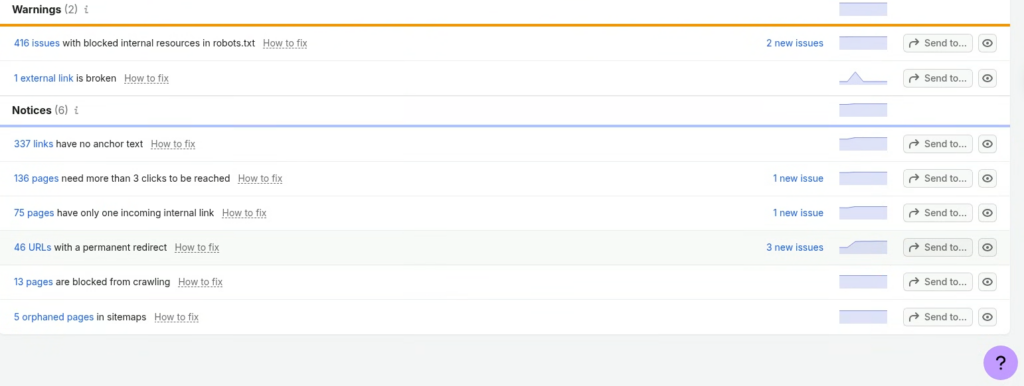
Semrush Site Audit on a live Shopify store: 416 blocked resources, 136 pages more than 3 clicks deep, 75 pages with one incoming link and 5 orphaned pages in the sitemap.
1. Blocked internal resources and pages
Shopify’s default robots.txt stops the cart, checkout and internal search, which’s smart. The warning shows up when scripts, stylesheets or images your pages need are blocked too. Don’t get worried about the number. Open the issue. Check what is blocked. Safe files are okay. CSS or JavaScript that Google needs to render the page are not so let through.
Also look at the 13 pages blocked from crawling. Each block should be on purpose like cart or search pages and never a group you want to appear in search results.
2. Pages buried too deep
Bots follow links and pages more than three clicks from the homepage get crawled less often. On Shopify the usual problems are products, paginated collections and blog posts. Add collections to your menus, link related products to each other and connect articles to the collections they support.
Pagination needs attention. Google no longer uses rel=”next”. Rel=”prev” so each? page=2 style page needs a normal crawlable link. Infinite scroll or “load more” buttons that depend on JavaScript can hide products from bots so keep an option in the HTML.
3. Weak internal linking: one inbound link, orphans in sitemaps
A page with an incoming link is not strong. If that link disappears in a menu change the page becomes an orphan. Add two or three links to every page that matters.
Orphans are worse. Shopify’s sitemap includes pages automatically so a page can be in /sitemap.xml while nothing on your site links to it. Old landing pages, retired seasonal collections and forgotten blog posts are common. Link to them from a page or delete them if they have no value.
4. Links with no anchor text
These are often image- links, like product cards, logos and icons with no text or alt text. Bots then have an idea what the linked page is about. Add text or alt text and make sure your theme does not create empty links.
5. Redirects and broken links
A permanent redirect is not a mistake but internal links should point directly to the final URL. When product A redirects to B and B later redirects to C bots follow steps. Update the redirect to point at the final destination.
When you delete a product, send it to the relevant alternative, not the homepage. Manage redirects under Online Store, Navigation, View URL Redirects. Check the box that creates a redirect when you change a handle. Broken external links seem small. They add up so fix them during every audit.
6. Duplicate and filter URLs (common on larger stores)
This report did not flag it but it is the most Shopify-specific issue. One product can be at /products/shirt and at /collections/shirts/products/blue-shirt. Canonical tags usually point to the URL yet your internal links should use it too.
Filters create duplicates with parameters like ?filter.v.price.gte=20. Combine the options and you get thousands of near identical URLs. Keep these away from the crawl path with robots.txt rules or canonicals to the main collection. If a filtered view has search demand, like red running shoes, turn it into a real collection instead.
7. App and JavaScript bloat
Every app can add scripts and some put content in with JavaScript. If product descriptions, reviews or links only appear after scripts run Google may not see them. Check your apps every three months. Remove leftover code from uninstalled ones.
Notice what the screenshot does not show: no big problem. Most Shopify crawlability issues are quiet. Build up through small choices, which is why a monthly check helps.
How to Diagnose Crawlability Problems on Your Store
You don’t need tools to start. Use this order:
- In Google Search Console, look for Page Indexing report. Look at the “Discovered not indexed” and “Crawled currently not indexed” sections. A lot of product or collection URLs is a warning sign.
- Crawl Stats report. Found under Settings in Search Console it shows how often Googlebot visits, response codes and file types. Spikes in 404s or redirects stand out quickly.
- A site crawler. Tools like Semrush Site Audit, Screaming Frog or Sitebulb crawl your store the way a bot would. Look for parameter URLs, redirect chains, broken links and pages with no incoming links.
- The URL Inspection tool. Test your important products and collections one by one to see what Google actually saw, including the rendered HTML.
- A site search check. Type site:yourstore.com into Google. Compare the number of results with the number of pages you actually want indexed.
A Step-by-Step Checklist to Improve Shopify Crawlability
Step 1: Submit and verify your sitemap. Add yourstore.com/sitemap.xml in Search Console. Make sure the number of submitted URLs matches your catalog.
Step 2: Clean up your linking. Link to product URLs add breadcrumbs and connect related products and collections with descriptive links. Use blog posts to link into collections and keep every key page within three clicks of the homepage.
Step 3: Control low-value URLs. Decide which parameter, tag and filter pages should not be crawled and block or canonicalise them on purpose and keep CSS and JavaScript files open.
Step 4: Fix errors and redirects. Repair broken links, remove redirect chains and send deleted products to the closest relevant alternative, not always the homepage.
Step 5:. Merge thin pages. Empty collections, near collections and tiny pages hurt your site. Combine them. Give them real content.
Step 6: Keep your site lean. Remove apps, compress images and make sure primary content loads in the initial HTML.
Step 7: Monitor every month. Crawlability is not a one-time project. New products, apps and campaigns bring problems.
Editing robots.txt on Shopify Safely
Shopify lets you change robots.txt by adding a robots.txt.liquid template to your theme. This is strong and where many stores make mistakes. A single wrong rule can stop a collection from being crawled.
Before you change anything, copy the default rules so you can get them back. Make changes one at a time. Block only parameter patterns you know are waste. Never block CSS or JavaScript files that Google needs to render your pages. After publishing, test URLs with the URL Inspection tool to confirm they are still accessible.
Mistakes That Make Shopify Crawlability Worse
- Adding no index to a page and also blocking it in robots.txt. Bots cannot see the no index tag if they can’t crawl the page.
- Redirecting every deleted product to the homepage, which Google may see as a 404.
- Letting a dozen apps each add their tracking and widgets.
- Creating a collection for every keyword variation without real content.
- Ignoring Search Console warnings because “the store still sells.”
Final Thoughts
Improving crawlability on your Shopify website is an ongoing habit, not a one-time fix. As the audit above shows, most crawlability problems are quiet: deep pages, weak internal links, stray redirects and blocked resources build up until rankings stall.
Start with your biggest issue this week and re-run your audit next month to confirm the numbers are moving. If you’d rather not do it alone, FirstLaunch, a Shopify website development agency, can audit your store, fix the issues holding your pages back, and build a structure search engines can read easily.
Contact FirstLaunch today for a crawlability review of your Shopify store.
Frequently Asked Questions
What is crawler access in Shopify?
Crawler access is whether search engine bots can reach and read your store’s pages. On Shopify it is mainly controlled by your robots.txt file (editable through a robots.txt.liquid template), your sitemap, no index tags and any storefront password. A password-protected store blocks crawlers completely.
What does crawlability mean in SEO?
Crawlability is how easily search engine bots can discover and move through the pages on your website by following links and reading your sitemap. If a page can’t be crawled, it can’t be indexed or ranked.
How can I check if my website is crawlable?
Use Google Search Console. The URL Inspection tool shows whether Google can access a specific page, and the Page Indexing and Crawl Stats reports show wider problems. You can also run a site crawler to find blocked pages, broken links and orphaned pages, and check your robots.txt at yourstore.com/robots.txt.
What are some good website crawling tools for SEO?
Google Search Console (free), Semrush Site Audit, Screaming Frog, Sitebulb and Ahrefs Site Audit are all widely used. Search Console shows how Google sees your site, while the others crawl it the way a bot would.
How often will Google crawl my website?
There is no fixed schedule. It can range from every few days to every few weeks, depending on your site’s size, popularity, how often you update it and its technical health. You can’t force a crawl rate, but submitting your sitemap and requesting indexing for new or updated pages in Search Console can speed up discovery.

